
Vita Mahjong for Seniors
Vita Mahjong is designed around large tiles, simple controls and ordinary levels without a timer. It is free to download and includes ads and optional purchases. Here is how to help an older relative start playing, adjust the available settings and protect progress before changing phones.
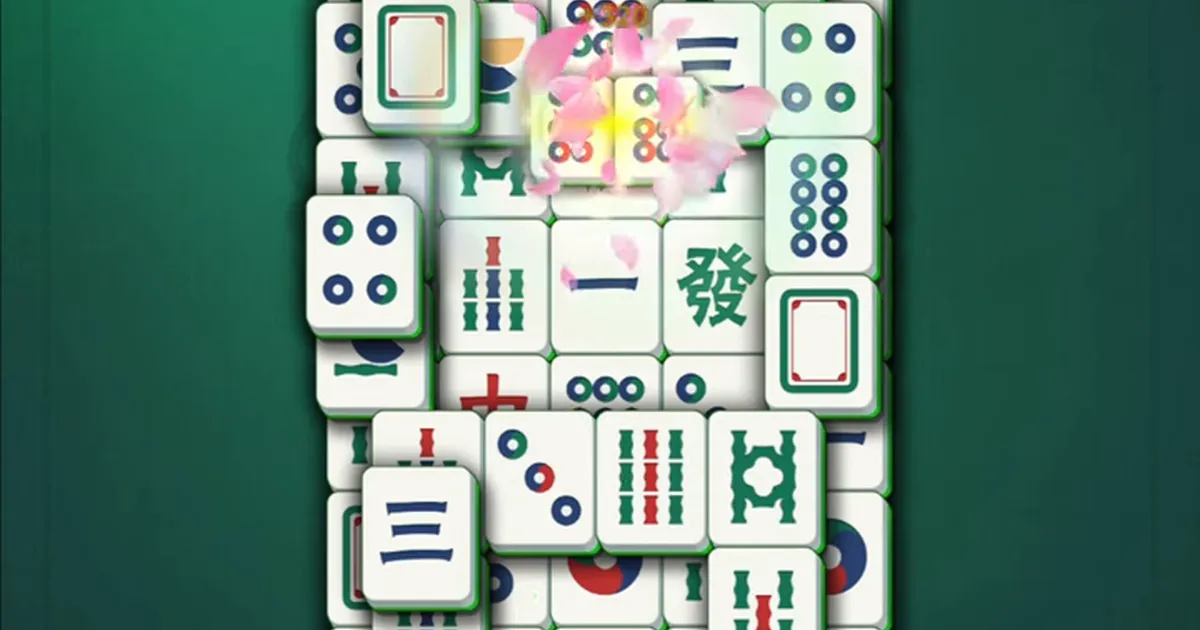
Why the game can be easier to use
The board uses large tile faces and a warm background, with the level and score above the board and helpers below it. Ordinary levels have no timer or lives limit, so there is no need to hurry through a move. Readability still depends on the device and the player: a comfortable design cannot guarantee that everyone will find the symbols easy to see.
The basic action is to tap two matching free tiles in turn. There are no keyboard combinations to memorize. A missed tap does not remove a different pair; simply try again. A tablet can make the same symbols easier to inspect. For a first demonstration on a computer, see the computer options, including a separate browser game.
Choose a comfortable screen
A tablet resting on a table is often easier to use than a small phone held in one hand. Try rotating the device if the installed version supports landscape mode; rotation and the board layout can vary by device. Do not assume that every version stretches to fill the screen.
| Device | What to check |
|---|---|
| Tablet | Larger visible tiles; support the device on a table or stand. |
| Phone | Check tile readability and available orientation before settling into a long session. |
| Computer | A larger screen, with mouse or touch controls; the browser game is separate from the app. |
Install and play the first board together
- Open Google Play on Android or the App Store on iPhone or iPad. Use the official links on our download page.
- Search for Vita Mahjong and check the Vita Studio developer identity. A similarly named Microsoft Store title is from Stgames and is a different game.
- Install the free app. Optional purchases come later; installation itself does not require buying an ad-removal package.
- Open the game and work through its tutorial. Let the player make the taps rather than taking over every move.
You can also try matching tiles in the browser first. That game is Mah, not a web copy of the Vita Studio app.

Check these settings
Open the gear icon and review the controls shown in the installed version. The English settings documented in the game include separate switches for Music, Sounds, Voice and Vibration. Turn off only the effects the player finds distracting.
Look for Save your progress while the original phone still works. Earlier English versions offered Google and Facebook sign-in; use an option actually shown on this device and note which account was used. Do not assume an account is connected just because the phone already has a Google account. Our progress guide explains the checks before a transfer.
| Setting | Why check it |
|---|---|
| Music and Sounds | Background music and game effects can be adjusted separately. |
| Voice | Turn spoken prompts off if they distract rather than help. |
| Vibration | Disable it if feedback on taps is uncomfortable. |
| Save your progress | Check the available account connection before the phone is lost or replaced. |
Explain ads before they appear
Show the difference between the game board and a full-screen advertisement. Tapping the picture inside an ad may open a store page; closing it requires the close control when it becomes available. Its position and timing depend on the ad.
A reward offer after a daily-task stage can invite the player to watch a video to double a reward. That is an optional offer, not a requirement to learn the game. Explain how to decline it. If ads remain a problem, read the exact terms of the current purchase or subscription before paying: ad-removal offers do not necessarily cover every optional rewarded video.
Attention practice without promises
Looking for pairs uses attention and short-term recall of where tiles are located. This is common to matching puzzles, not a unique proven health benefit of Vita Mahjong. Active Mind is a separate mode intended for memory and attention practice.
Choose short, comfortable sessions rather than a schedule the player dislikes. The memory guide separates gameplay practice from what research actually tested. Play the first board together and demonstrate hints, reshuffling and closing ads; installing the app and leaving immediately makes those unfamiliar steps harder.
When a move is hard to find
First check the upper layers and the outer edges. A tile with a matching picture can still be blocked. If a legal pair is difficult to spot, a hint highlights an available match. When no pairs remain, use the reshuffle or restart option provided by that version; check any reward-ad or purchase prompt before confirming.
Restarting changes the board rather than advancing the level. The rules guide explains free tiles, and the tips page shows how to open more options before a board becomes stuck.
Make learning a shared activity
Sit alongside the player and take turns: one person finds the pair, the other taps it. A few boards together give time to ask questions without having to remember every control at once. If you live apart, a video call can help you demonstrate a hint or explain what a cleared pair looks like.
Vita Studio also makes Vita Solitaire, Vita Color, Vita Jigsaw and Vita Word Search. Those are other games from the developer, not extra modes inside this app. If tile matching does not appeal, a different puzzle may be more enjoyable than insisting on this one.
Frequently asked questions
Is Vita Mahjong suitable for someone with poor eyesight?
Its large tiles may help, but check the actual screen with the player. Adjust device brightness for comfort. Do not promise a tile-size slider inside the app; a tablet may be the simpler solution.
Are the controls complicated?
Tap two matching free tiles in turn. Dragging one matching tile onto another is also described in the source game controls. Start with tapping and demonstrate a hint before introducing other options.
What if my relative worries about breaking the phone?
A wrong tile choice does not damage the phone. Explain the difference between a board action and an ad or purchase prompt. Mah in our browser has Undo; the mobile app has its own helpers, reshuffle and restart controls.
Can sounds and voice be switched off?
The documented settings have separate Music, Sounds, Voice and Vibration switches. Check the labels available in the installed version.
Can it be played while traveling without internet?
Ordinary downloaded levels support offline play. Installation, updates, syncing and some daily or online content need a connection. Test a board offline before leaving.
Can progress be moved if the old phone breaks?
A previously connected account may allow recovery. If progress existed only on the lost device, recovery is not guaranteed. Connect and check the account while the old phone still works.