
How to Play Vita Mahjong
Match two identical free tiles, remove them and keep going until the board is clear. A free tile has nothing on top and at least one open side, left or right. Ordinary Vita Mahjong levels have no timer, so inspect the layers before tapping.
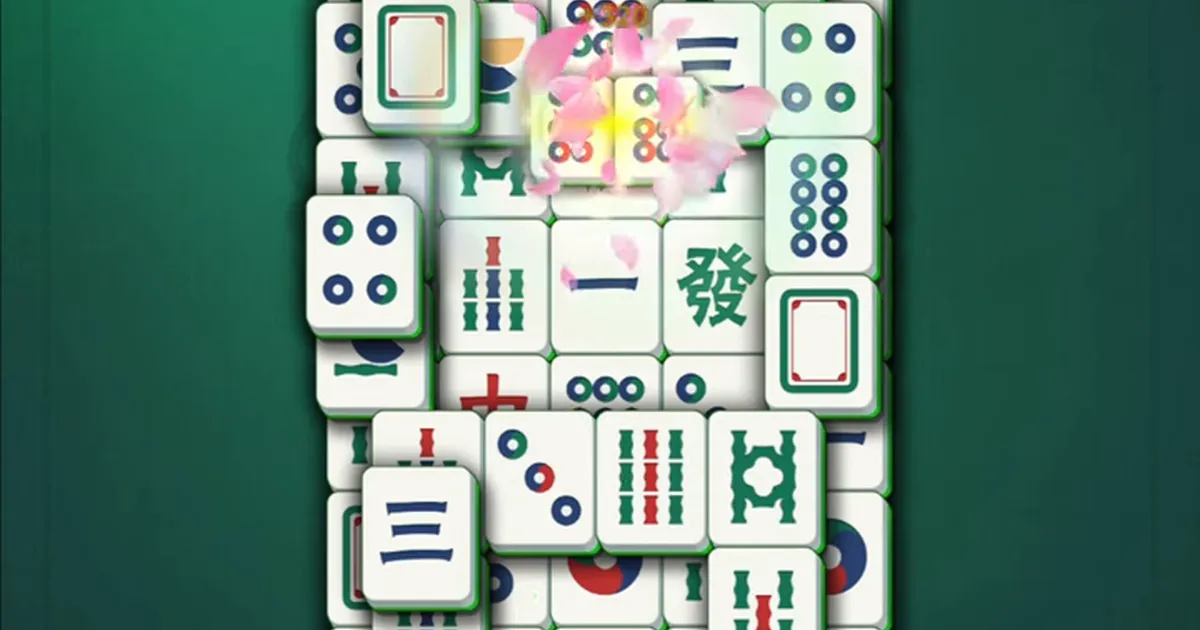
Clear the board, one free pair at a time
Tiles form stacked layouts, including grid-like shapes and crescents. Removing a pair uncovers part of the next layer. The aim of an ordinary level is to remove every tile, rather than build the hands used in traditional multiplayer mahjong.
Both conditions for a free tile matter: nothing may cover it, and its left or right side must be open. A tile at the top of a stack can still be trapped between neighbors on both sides. An outside tile can be free even with more layers beneath it. Check the tile itself, not just whether you can see its picture.
Remove your first pair
- Look along the upper layers and outside edges for a free tile.
- Find a second free tile with the same picture. A visible matching face underneath another tile does not count yet.
- Tap the two tiles in turn. The documented controls also allow dragging one matching tile onto the other.
- Inspect the newly exposed tiles before choosing the next pair.
Want to practice the basic rule? Play Mah in the browser without installation or registration. Its controls and progress belong to a separate game.
Hints, shuffle, undo and restart
A hint identifies a legal pair; it does not make a blocked tile playable. Shuffle rearranges the remaining tiles rather than adding new ones. Restart begins the level again and, in the documented mobile version, reshuffles it without spending a saved shuffle. Read any current confirmation before proceeding.
Undo deserves a distinction: the Mah browser game on this site supports repeated undo. Do not assume the mobile app has the same unlimited control. Use the helpers actually shown on its screen.
| Tool | When it helps |
|---|---|
| Hint | The board has a legal pair that you cannot spot. |
| Shuffle | No matching free pairs remain. |
| Undo in Mah | You want to reverse a choice and try another sequence. |
| Restart | You want a fresh attempt at the level. |
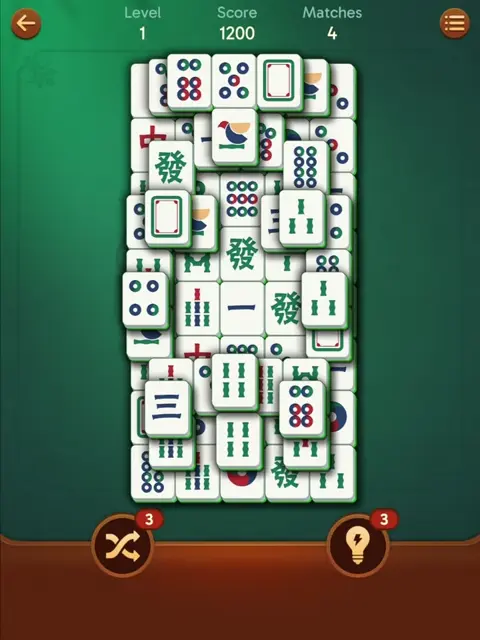
Auto Match and Auto Complete
The documented English settings include Auto Match. It enables a Shooting Star effect that can remove a random free pair. Multiple Match can clear further matching pairs that become available together. For a group of three identical pairs to clear automatically, all three need to be open at the same time.
Auto Complete finishes a board once its completion condition is reached and adds the completion bonus. These helpers are described as preserving the combo in the documented version. Keep them on if you enjoy the assistance, or inspect the settings if you prefer choosing each move yourself. Their availability and exact behavior can change with updates.
Read the board controls
The upper part of the mobile screen shows the back control, level, score and a Matches count. Matches is the number of pairs currently available, not the total pairs left in the whole layout. The gear opens settings; hint and shuffle buttons below the board show their remaining uses.
If Matches is above zero, there is a move to find. If it reaches zero, a hint cannot create a legal match; shuffle or restart is the relevant next step. Tapping a blocked tile can display a short explanation, such as being blocked on the left and right. Use that explanation to identify which neighbor must be cleared.
Keep a combo by checking before tapping
A combo is a run of successful matching moves without an invalid tile selection. Longer runs increase the scoring bonus. Tapping a tile that cannot yet be taken breaks the run; using a hint does not.
There is no reason to trade accuracy for frantic tapping on an ordinary untimed board. Before touching a promising pair, check both top surfaces and at least one open side on each tile. A long uninterrupted run can trigger the visual effects described as a super combo.
A useful starting strategy
Work from the top down and the outside inward. Prioritize pairs that uncover another layer or release a blocked row. Leave deep central tiles until their covering and neighboring tiles have been removed.
This is a way to compare moves, not a guarantee that every first pair will solve every layout. With several identical tiles, consider which two open the most useful space. See advanced tips, memory practice or the guide index for the next step.
Avoid these early mistakes
- Random tapping breaks combos without revealing a legal pair.
- Shuffling while useful pairs remain spends a helper unnecessarily; inspect the board or use a hint first.
- Focusing only on the middle leaves useful upper and outside tiles untouched.
- In the browser game, overlooking Undo makes it harder to compare two possible sequences. In the app, use the available restart or helper instead of expecting identical controls.
Super-combo effects show that a run is continuing, but clearing the board matters more than an effect. Start with accurate matching and learn the scoring details afterward.
Use the early levels to learn the interface
Early boards have fewer layers and more readily available pairs. Try the hint control and learn where settings are before the layouts become dense. In Mah, also try undoing a pair to see what it restores.
For a first session with an older relative, use the setup guide. When the basic rule feels familiar, compare Daily, Journey and other modes. Ordinary levels, time-limited events and the separate browser game do not all have the same goals.
Three examples of free and blocked tiles
Imagine a tile in the middle of the top layer. Its picture is completely visible, but another tile touches each horizontal side. It is blocked. Being on the highest layer satisfies only the first condition; you still need an open left or right side. Look for a removable pair involving one of those neighbors before trying the middle tile again.
Now imagine a tile on the far left edge with another tile partly covering its top. The left side is open, but the covering tile prevents selection. Clear the covering pair first. A small visible corner is enough to identify a picture, but it does not make that picture playable.
Finally, consider an uncovered tile with a neighbor on its right and empty space on its left. Tiles in neighboring rows on the same layer do not block it, provided no tile lies on top of it. You do not need both horizontal sides open. Find another free tile with the same face; a matching tile elsewhere that is still covered cannot complete this pair.
These are rule examples, not a solution for a particular numbered level. Apply the two checks to the actual arrangement on your screen. If an edge is difficult to see, pause your search and inspect the overlap instead of testing several random taps.
Choose between three matching tiles
Suppose three copies of the same ordinary symbol are available: A on a tall stack, B along an outside row and C in an already open area. You can remove only a pair at a time. Before choosing A and B simply because they are close together, compare what each possible pair exposes.
- A plus B may uncover a lower tile and release the end of the row.
- A plus C may uncover the same lower tile while leaving B available as a partner later.
- B plus C may open the row but leave the tall stack untouched.
There is no universal winner from that description alone. Look at the newly accessible symbols and any other copies you can already see. A move that opens a needed partner can be more useful than one that only makes the board look smaller. You cannot reliably plan around the faces of tiles that are still hidden.
Removing a tile creates space; it does not physically put a new obstacle onto the board. The risk is spending an accessible matching partner before a buried copy can be reached. This is why pair choice matters even though every successful move reduces the number of tiles.
In Mah you can compare choices with Undo. In the mobile app, make this comparison before tapping if an undo control is not available. Do not spend a paid helper just to reproduce this example: an ordinary opening with several legal pairs is enough to practice the decision.
Diagnose a pair that will not disappear
- Check both faces. Similar colors are not enough for ordinary tiles. Compare the full symbol and its markings. Special matching groups have their own rules; see the tile guide when the pictures are intentionally different.
- Check the first tile. Inspect its top and both horizontal sides. A selected-looking highlight is not a reason to skip the freedom test.
- Check the second tile separately. A free first tile cannot make a covered partner selectable. Find the covering or side-blocking pair that must go first.
- Read any on-screen explanation. A message about blocked sides describes the position. It does not mean that your whole game is broken.
- Separate a rule problem from a frozen app. If menus and other controls respond, inspect the move. If nothing responds, use the loading and freezing guide before deleting anything.
When there are no legal pairs, repeating the same taps cannot change the layout. Compare the available helper choices and read any cost or advertisement prompt. Restarting a board is different from resetting an account or reinstalling the application.
A first-session exercise without a speed target
On an early ordinary board, spend your first few moves explaining why each tile is free. For example: “Nothing covers this one, and its right side is open.” Then explain the same condition for its partner. This makes it easier to notice whether a mistake came from matching the picture or reading the layers.
For the next few pairs, predict what will become visible before you tap. After the pair disappears, compare the result with your prediction. You do not have to remember the entire board; recognizing one newly exposed tile or one freed neighbor is a useful starting task.
If you get stuck, scan once across the outside edges and once across the top surfaces. Check Matches, then use a hint when a legal move remains. After the hint, identify why you missed that pair: similar symbols, a partly hidden edge or attention fixed on another part of the board. That explanation is more useful than treating the hint as a failure.
End the exercise when you have understood the controls, even if the board is unfinished. There is no required daily duration or promised improvement schedule. On the next board, practice the part that caused difficulty. For a player who mainly wants a quiet puzzle, turning a relaxing session into a timed test is unnecessary.
Frequently asked questions
How do I know a tile is free?
Nothing lies on top of it and either its left or its right side is open. A visible tile blocked on both sides cannot be taken yet.
How do I remove a pair?
Tap two identical free tiles in turn, or use the documented drag-to-match control. Both tiles must be free when matched.
What if I cannot see a pair?
Use a hint if Matches shows a legal pair exists. If no matches remain, shuffle or restart; a hint cannot open a blocked tile.
Can I undo a move?
Mah on our browser play page supports repeated undo. The mobile app has its own controls; unlimited browser undo should not be assumed to apply to it.
What is a combo?
A series of matching moves without invalid taps. Tapping a blocked tile breaks it, while a hint does not. Longer runs increase the scoring bonus.
Which tiles should a beginner remove first?
Start with upper and outside pairs that expose more tiles. Recheck the board after each move rather than clearing only the middle.
Do I move tiles around or tap them?
Tap matching free tiles or drag one onto its match. Dragging selects the pair; it does not let you relocate a tile to an empty board position.